//the problem
Every phone number reassignment was a blind decision. Admins couldn't see what would break until it already had.
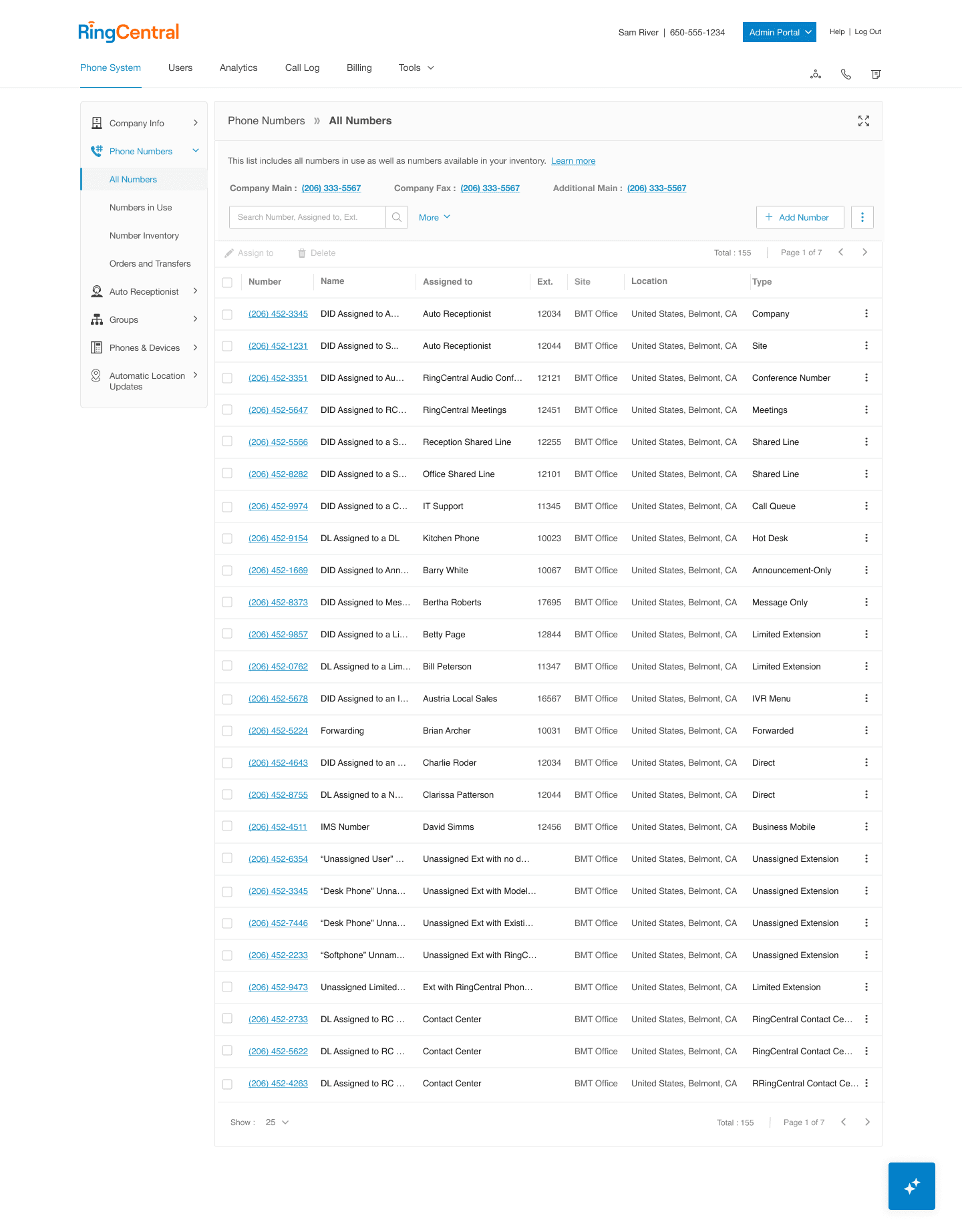
Within the RingCentral Admin Portal, phone numbers are connected to call queues, auto receptionists, emergency routing, and shared lines. These dependencies aren't visible during reassignment, the system just accepts the change. When something downstream broke, it showed up as a support ticket, not a warning. Admins had no way to preview impact before committing.
//my impact
These numbers prove it worked
Before the banner, admins had no signal that a reassignment was risky until something broke downstream.
After launch, the numbers tell a different story. Nearly 1 in 3 flagged reassignments were voluntarily stopped.
Nearly 3 in 4 admins now pause to review conflict details before confirming.
Configuration-related support tickets dropped by 74%. None of these outcomes came from blocking admin action, but rather, they came from making the consequences visible.
of flagged reassignments were voluntarily canceled after admins reviewed the downstream impact — not because they were blocked, but because they chose to stop.
of admins now review AI-surfaced conflict details before confirming a reassignment.
Configuration-related support tickets per month, after launch.
//my role
Sole UX designer. Embedded with engineering.
I owned the full interaction design for the conflict detection experience. This included what the system flags, how risk is ranked, how the banner behaves, and what it says to the admin. None of it was designed in isolation. I worked directly with engineers to map what was technically detectable against what was actually causing damage, and used that intersection to drive every design decision. Engineering defined what was detectable. I defined what was worth showing.
What engineers owned
What I owned
Where we collaborated
//design approach
Before designing anything, I needed to answer two questions: which conflicts were actually causing damage, and which of those conflicts the system could realistically surface at the moment of reassignment.
Support Ticket Analysis
Support ticket analysis gave me the first answer. I reviewed months of configuration-related tickets to identify which conflict types were recurring, which caused the most downstream damage, and which admins consistently failed to anticipate.
Dependency Mapping
Working directly with engineers, I mapped which conflict types were detectable at the point of reassignment, given the data the system had access to and the performance constraints of surfacing a warning in real time.
4/mo
Auto Reception
14/mo
E911
10/mo
Call Queues
8/mo
Auto Shared Lines
2/mo
Other
E911 routing disruption
Auto receptionist fallback
Call queue breakage
Shared line conflicts
Service links
Active states
Conflict type
Affected scope
What to flag
What was breaking
What was detectable
//key design decision
When a configuration conflict is detected, there are three ways to handle it. Each makes a different trade-off between protection and admin control.
A. Hard block
Prevent the change from saving entirely until the conflict is resolved.
Why not:
Admins sometimes have legitimate reasons to override. A hard block removes their judgment from the equation and erodes trust in the system.
B. Inform before action
Surface the downstream impact at the moment of change, before it's applied. Let the admin decide.
Why this:
Admins see exactly what will break, which services are affected, and what the consequences are. Admin choose to proceed, adjust, or cancel. The AI advises. The admin decides.
C. Notify after save
Alert the admin after the change has already been committed.
Why not:
The damage is already done. A post-save notification has no preventive value, it just tells the admin what they broke.
//solution
01. AI Indicator & Alert Trigger
02. Conflict Banner
03. Impact Table
04. Persistent Caution State
05. Guided Resolution
01. AI Indicator & Alert Trigger
Does the admin see impact before saving?

Here's how each state works. A persistent AI icon sits in the corner of the interface, indicating the system is actively monitoring. When the admin initiates a reassignment that would create a conflict, the icon transforms into an expanded alert banner, appearing before the save action completes.
Rationale:
The icon-to-banner expansion was a deliberate choice over a modal or toast notification. Modals would block the workflow; toasts are too easy to miss. The expansion from an element already in the admin's peripheral vision creates attention without disruption.
02. Conflict Banner
Can they tell a high-risk change from a safe one?
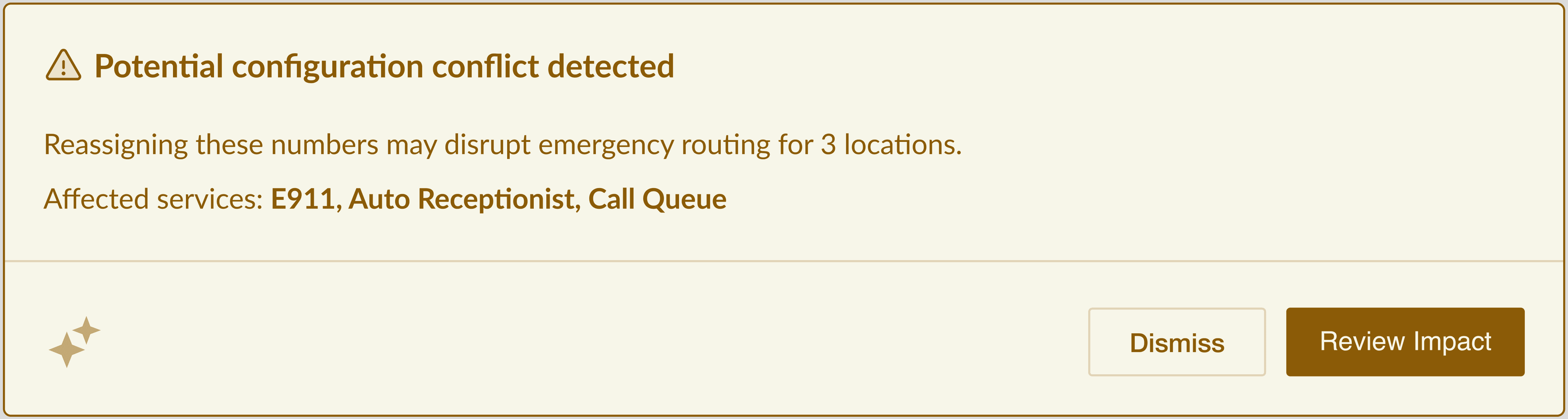
The banner surfaces three things instantly: what was detected, what it would affect, and which specific services are at risk. The admin knows the severity in a single scan. The AI sparkle icon in the footer signals this is AI-detected, maintaining transparency about the source.
Rationale:
I named specific affected services rather than showing a generic "conflict detected" message. Admins said they ignore vague warnings but act on specific ones. "E911" in the affected list carries immediate weight, it tells the admin this isn't a low-stakes change.
03. Impact Table — Line-by-Line Consequences
Does the warning appear in their current workflow?

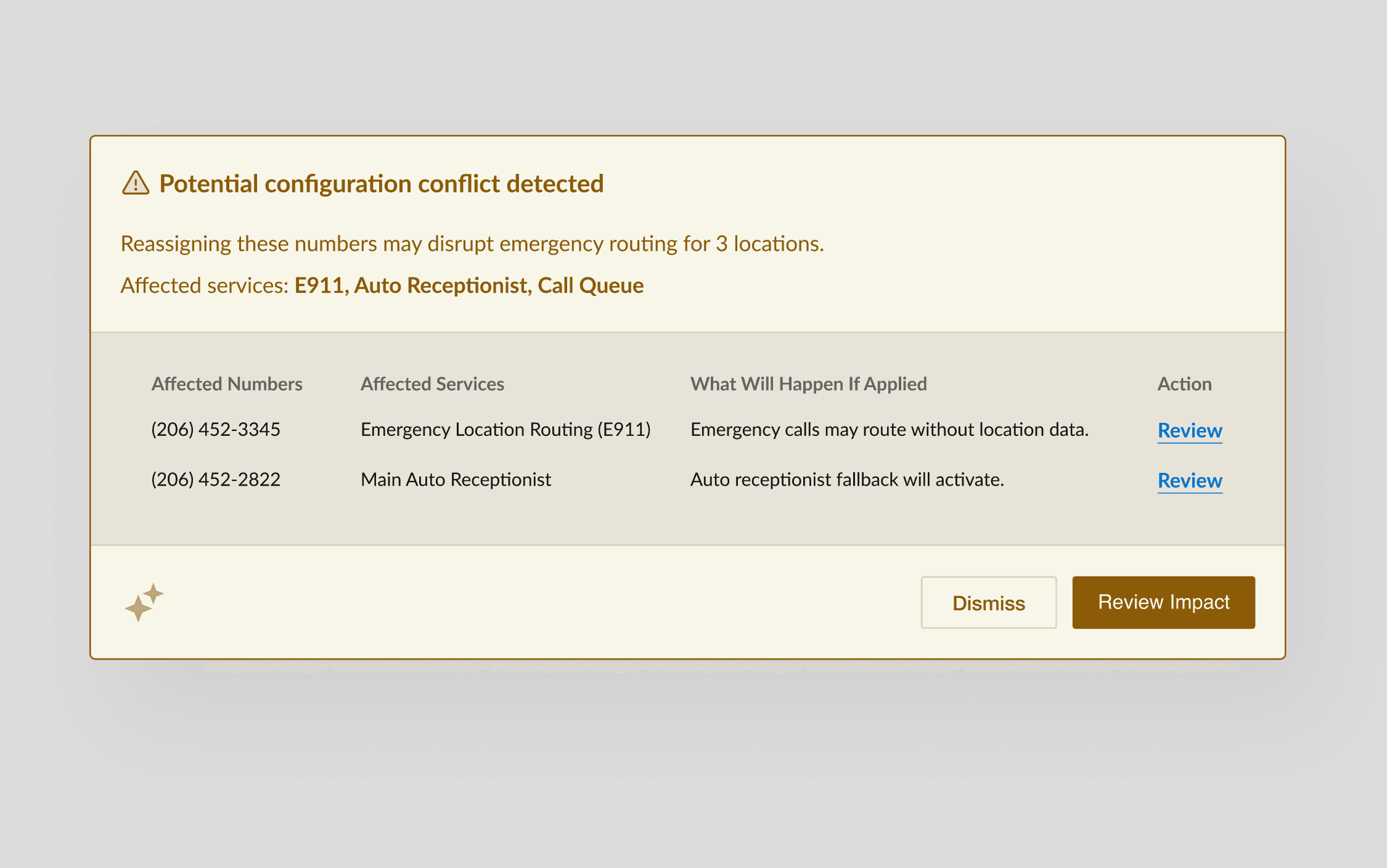
When the admin clicks "Review Impact," the banner expands to reveal a structured table: which numbers are affected, which services they're tied to, and plain-language description of what will happen if the change is applied. Each row has a "Review" link to drill into that specific dependency. The "What Will Happen If Applied" column is the design's centerpiece. It translates system dependency data into consequence language an admin can act on.
Rationale:
I structured consequences as forward-looking statements ("will happen if applied") rather than backward-looking descriptions ("is connected to"). Admins are evaluating whether to proceed. The language matches that decision frame.
04. Persistent Caution State
Can they still override if they need to?
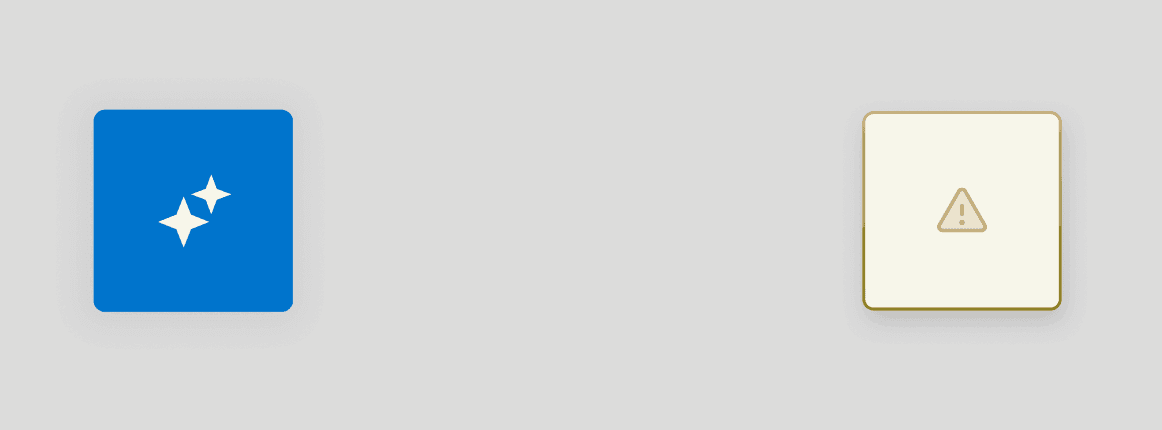
DISMISSED
If the admin dismisses the banner, the icon doesn't return to its default blue state, instead, it shifts to a cautionary appearance with a warning icon on a muted gold background.
The admin can proceed with the reassignment, but the visual change serves as a persistent reminder that a known risk was acknowledged. The system informed, the admin decided.
Rationale:
Engineering suggested returning to the default blue after dismissal. My informed reasoning was that the visual shift serves two purposes: it prevents accidental dismissal from looking identical to "no conflict," and it creates an implicit audit trail. If something breaks later, the caution state indicates the admin was informed.
Guided Resolution — Review Takes You There
Detection without resolution is just a better warning.
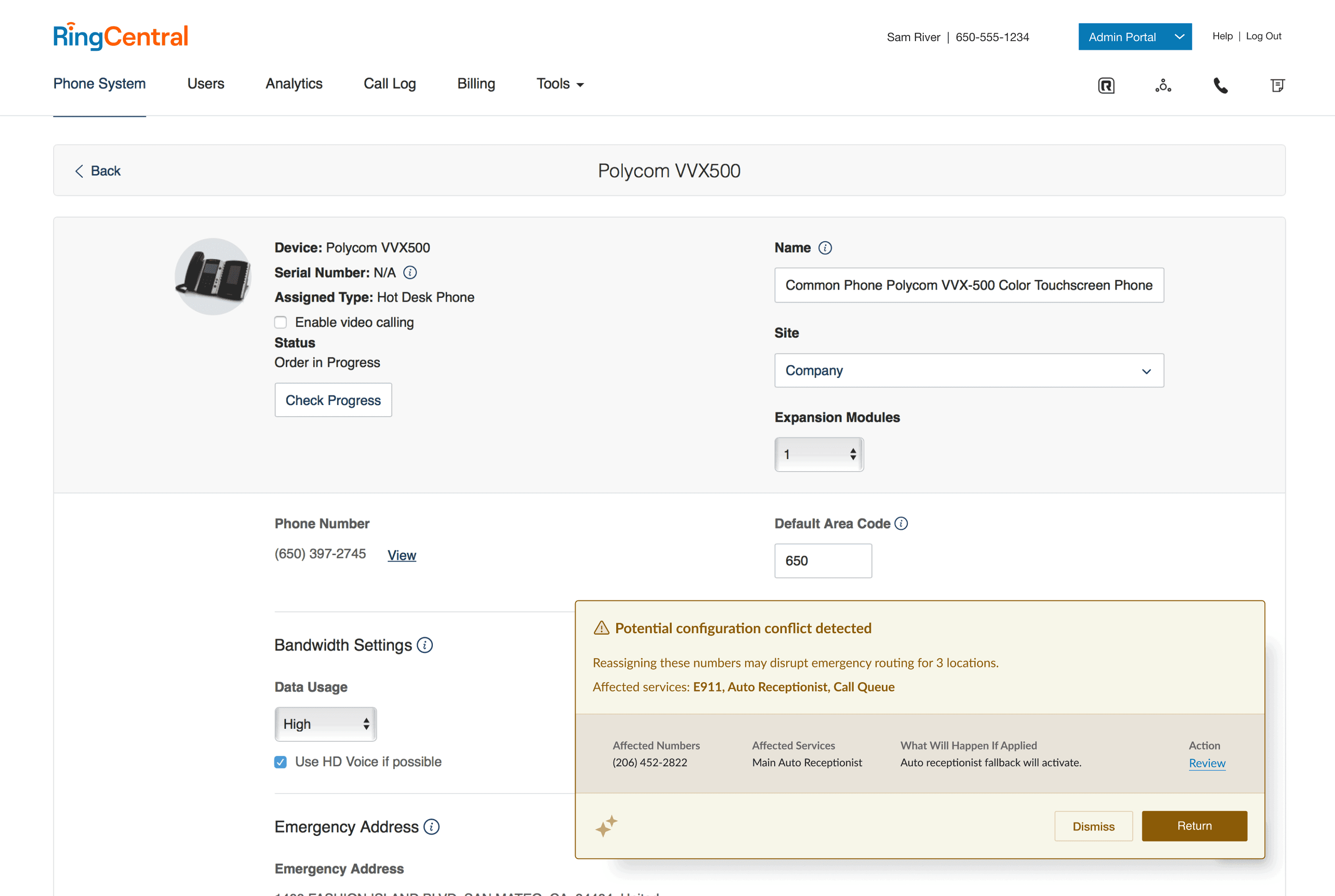
Each row in the impact table includes a "Review" link that navigates the admin directly to the page where the conflict lives. Once on the device page, the conflict banner persists in context, showing the specific impact for that device. A "Return" button brings the admin back to the original reassignment screen, preserving their place in the workflow. This completes the detection-to-resolution loop.
Rationale:
I pushed for the "Review" link to navigate rather than open a modal or side panel. Admins said they needed to see the full device page to make an informed decision. A preview panel wouldn't give them enough context. The "Return" button ensures the round-trip doesn't feel like a detour.

© 2026 Omer Malik