UX DesignDrawingsExperimental TechArticles

AI-Assist Flight Reroute Explanation Panel

Designed an AI-assisted explanation panel that increased dispatcher confidence and accelerated reroute decisions.

Designed an AI-assisted explanation panel that increased dispatcher confidence and accelerated reroute decisions.

Users

Flight Dispatchers

Focus

AI Implementation

Focus

6 weeks

This case study covers:

  • AI providing reasoning for its output (explainability)

  • Human-in-the-Loop

This case study covers:

  • AI providing reasoning for its output (explainability)

  • Human-in-the-Loop

Users

Flight Dispatchers

Focus

AI Implementation

Focus

6 weeks

AI-Assist Flight Reroute Explanation Panel

Designed an AI-assisted explanation panel that increased dispatcher confidence and accelerated reroute decisions.

This case study covers:

  • AI providing reasoning for its output (explainability)

  • Human-in-the-Loop

Users

Flight Dispatchers

Focus

AI Implementation

Focus

6 weeks

Summary of My Role & Impact

I led the UX strategy and interaction design, translating complex operational data (weather, fuel, compliance, and risk factors) into clear, explainable decision support.


The design introduced structured rationale, trade-off visibility, and guided AI explanations that reduced cognitive load while preserving dispatcher authority in safety-critical decisions.

Lack of centralized reasoning

4.4 / 5

Manual cross-checking burden

4 tools

1 panel

Limited explainability & trust

76%

03 Design Approach

Methods: Scenario-based design | Rapid wireframing | Cross-functional iteration

Team: Lead Dispatchers | Product Manager | Senior Developers

Human-AI UX framework:

01

Explainability

AI recommendations surfaced outcomes but not the operational logic behind them, forcing dispatchers to interpret intent on their own.

02

Cognitive Load Reduction

Consolidate scattered operational data into a single, scannable hierarchy — eliminating the 3-tool cross-check that fragmented the existing workflow.

03

Human Authority

Position AI as presenting evidence, not directives. Dispatchers approve, reject, or investigate further — the system never auto-executes a reroute.

01

Problem

Methods: HEART Framework | GSM

Team: Lead Dispatchers | Product Manager | Senior Developers | Director of Ops

AI recommendations told dispatchers what to do, but never why.

Without centralized reasoning, every reroute approval required dispatchers to manually reconstruct the AI's logic across three separate systems before they could make a decision.

ROOT CAUSE

Lack of centralized reasoning

AI recommendations surfaced outcomes but not the operational logic behind them, forcing dispatchers to interpret intent on their own.

BEHAVIORIAL EFFECT

3-tool cross-check per reroute

Dispatchers switched between Weather Radar, Route Planning, and Compliance/Ops systems to manually verify each recommendation before making a judgment.

OPERTAIONAL IMPACT

Lack of centralized reasoning

AI recommendations surfaced outcomes but not the operational logic behind them, forcing dispatchers to interpret intent on their own.

02

Challenge

Input from: Lead Dispatchers | Product Manager | Senior Developers | Director of Ops

AI recommendations told dispatchers what to do, but never why.

Without centralized reasoning, every reroute approval required dispatchers to manually reconstruct the AI's logic across three separate systems before they could make a decision.

ROOT CAUSE

Lack of centralized reasoning

AI recommendations surfaced outcomes but not the operational logic behind them, forcing dispatchers to interpret intent on their own.

BEHAVIORIAL EFFECT

3-tool cross-check per reroute

Dispatchers switched between Weather Radar, Route Planning, and Compliance/Ops systems to manually verify each recommendation before making a judgment.

OPERTAIONAL IMPACT

Lack of centralized reasoning

AI recommendations surfaced outcomes but not the operational logic behind them, forcing dispatchers to interpret intent on their own.

Stakeholders wanted a faster approval workflow.

The real problem was a transparency gap.

Initial conversations with Ops leadership focused on reducing time-to-approval. But through dispatcher interviews, a deeper issue surfaced: speed wasn't the bottleneck, understanding was. Dispatchers were compensating for a system that gave them no reasoning to evaluate.

Design Challenge

Design a centralized explanation interface that makes AI reroute reasoning visible, scannable, and trustworthy — without adding steps to the dispatcher's workflow or undermining their operational authority.

REAL-TIME CONTEXT

HUMAN-IN-THE-LOOP

SECONDS-LEVEL SCANNING

Summary of My Role & Impact

I led the UX strategy and interaction design, translating complex operational data (weather, fuel, compliance, and risk factors) into clear, explainable decision support.


The design introduced structured rationale, trade-off visibility, and guided AI explanations that reduced cognitive load while preserving dispatcher authority in safety-critical decisions.

Lack of centralized reasoning

4.4 / 5

Manual cross-checking burden

4 tools

1 panel

Limited explainability & trust

76%

03

Design Approach

Methods: Scenario-based design | Rapid wireframing | Cross-functional iteration

Team: Lead Dispatchers | Product Manager | Senior Developers

Team: Admin stakeholders · Product Manager · Engineering

Methods: Support ticket analysis · Admin interviews · Workflow mapping

01

Problem

I brought the pressure of live operations into the design process.

I structured the approach around a Human-AI UX framework with three pillars. Each one addressed a specific design tension from the challenge, and each was validated through scenario-based iteration with dispatchers working under simulated operational conditions.

Human-AI UX framework:

01

Explainability

AI recommendations surfaced outcomes but not the operational logic behind them, forcing dispatchers to interpret intent on their own.

02

Cognitive Load Reduction

Consolidate scattered operational data into a single, scannable hierarchy — eliminating the 3-tool cross-check that fragmented the existing workflow.

03

Human authority

Position AI as presenting evidence, not directives. Dispatchers approve, reject, or investigate further — the system never auto-executes a reroute.

04

Solution

Deliverables: AI Explanation Panel · Redesigned approval workflow · Decision factor hierarchy

The final design replaced the fragmented 3-tool validation process with a centralized explanation panel embedded directly into the reroute workflow. Instead of asking dispatchers to reconstruct the AI's logic, the system now surfaces it — structured around the trigger event, ranked decision factors, and clear authority controls.

04 Solution

Deliverables: AI Explanation Panel · Redesigned approval workflow · Decision factor hierarchy

PILLAR 01

Explainability

The AI system now communicates its reasoning across three progressive layers: why a review was triggered, what the operational impact looks like, and how competing route options compare. Each layer gives dispatchers a different depth of understanding without requiring them to leave the interface.

Reroute Trigger & Context

Problem: No indication of why a reroute was suggested

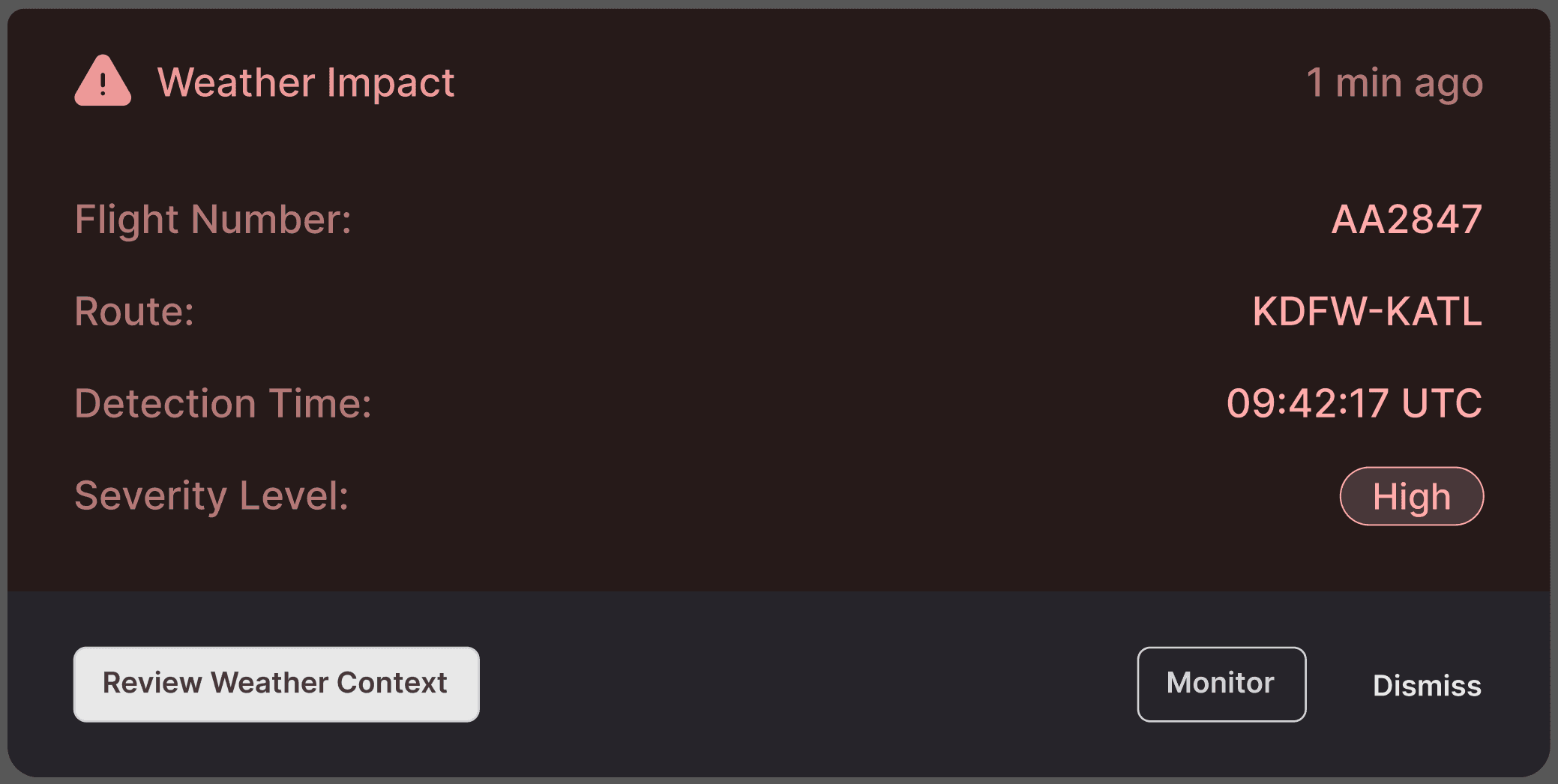
The experience begins with an alert card that surfaces the operational event driving the recommendation — weather impact, airspace restriction, or congestion — along with flight-specific context: flight number, route, detection time, and severity level.

The card appears contextually on the map view, anchored to the affected flight. Dispatchers see exactly which flight is impacted and why before they take any action.

My Rationale

I chose to lead with the trigger rather than the route change itself.

During scenario walkthroughs, dispatchers consistently asked "why is this happening?" before "what should I do?" The alert mirrors that mental model — event first, action options second.
Ranked Decision Factors

AI felt like a black box with no visible reasoning.

When a dispatcher taps "Review Weather Context," the system reveals the operational data behind the alert: aircraft state (type, fuel, altitude), an impact summary with specific segment and weather data, and a system engagement section explaining what triggered the automated review.

Information is structured as a progressive disclosure, the most critical data (impact summary) appears first, with aircraft context and system reasoning layered below. The animated text sequence reinforces the feeling that the system is actively processing and presenting its analysis, not just dumping data.

My Rationale

I structured this as a vertical narrative rather than a dashboard grid. Dispatchers don't compare these data points — they read them sequentially to build a mental picture of the situation.

The layout follows that reading pattern: what's happening → where → how fast → what the system thinks.

Route Comparison + AI Assist

Previously: Routes were abstract data — hard to compare mentally.

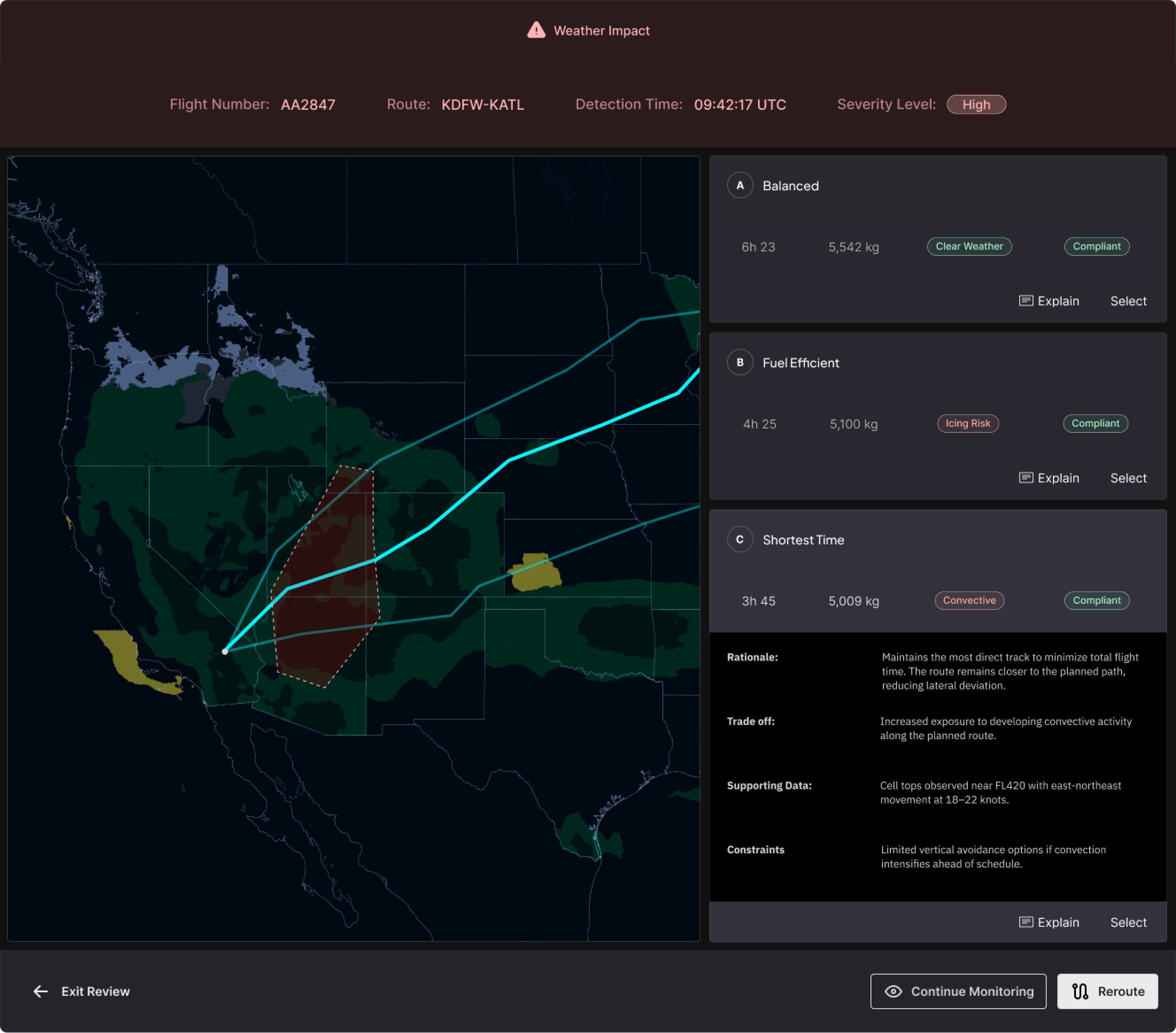
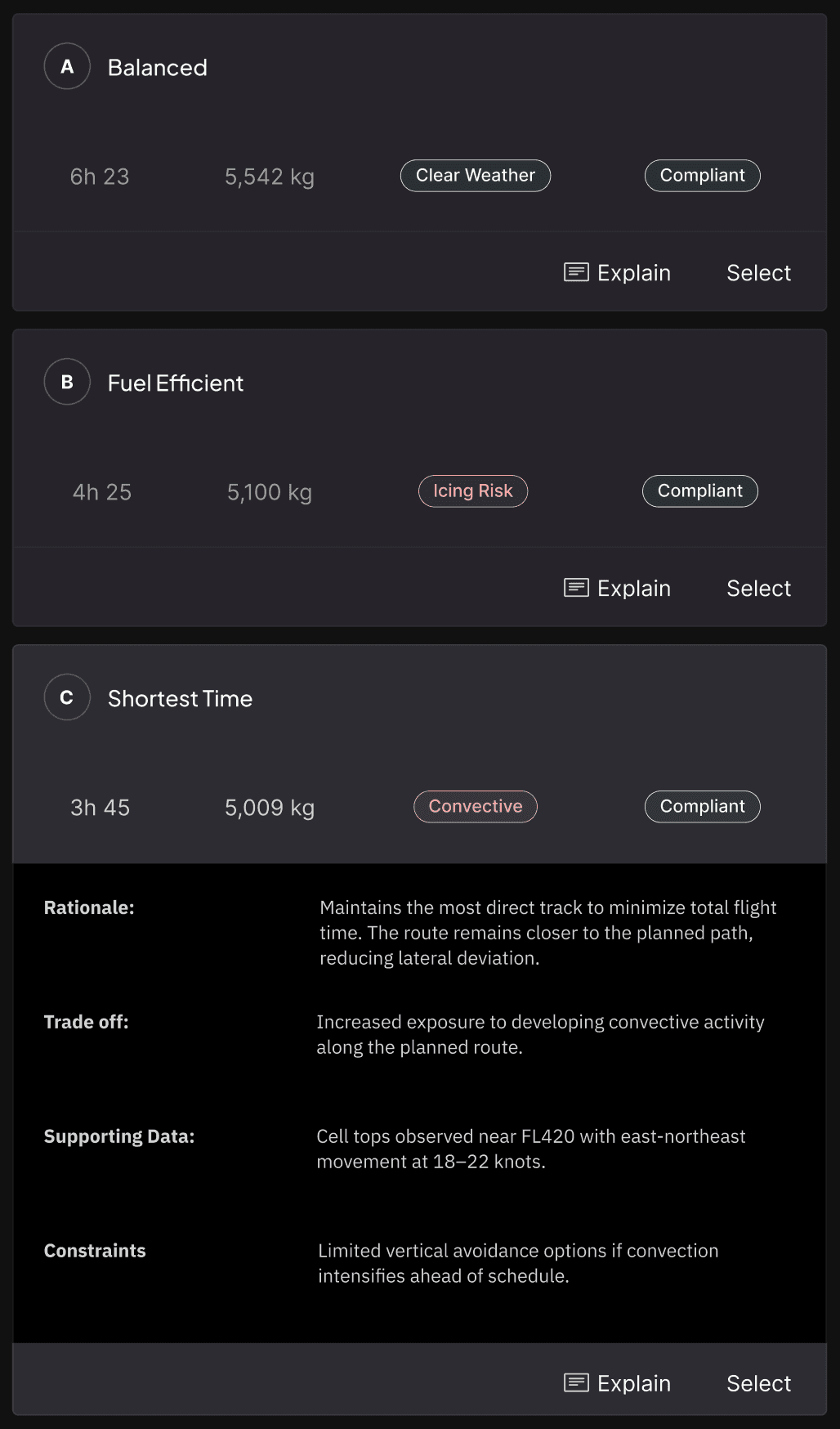
The comparison view presents AI-generated route options side by side, each with a clear optimization label (Balanced, Fuel Efficient, Shortest Time), key metrics (duration, fuel), and risk/compliance tags. The map visualizes routes against weather overlays with layer toggles for radar, satellite, jet stream, turbulence, and icing.

Each route card has an "Explain" action that expands to reveal the AI's rationale, tradeoffs, supporting data, and constraints — giving dispatchers the full reasoning chain without cluttering the comparison view by default.

My Rationale

I deliberately separated "what the route is" from "why the AI suggests it." The collapsed state supports fast scanning and comparison. The expanded "Explain" state supports deeper evaluation.


During scenario testing, dispatchers said they compare top-level metrics first, then drill into reasoning only for the options they're seriously considering. The progressive disclosure matches that behavior exactly.

PILLAR 02

Cognitive Load Reduction

Rather than adding another tool to the dispatcher's workflow, the design consolidates scattered operational data into a single progressive interface. Each screen reduces the number of systems touched and presents information in the order dispatchers actually process it.

Triage in the alert, not across tools

Previously: Dispatchers opened 3 tools to determine if action was needed.

The trigger card consolidates the initial triage decision into a single component. Flight number, route, severity, and event type are presented together, giving dispatchers enough context to decide whether to investigate, monitor, or dismiss without leaving the map view.

The three action buttons (Review Weather Context, Monitor, Dismiss) correspond to the three real decision paths at this stage. Low-severity events can be monitored or dismissed immediately, keeping the workflow unblocked for higher-priority flights.

My Rationale

The "Monitor" option was a direct result of dispatcher feedback. In the old workflow, there was no way to acknowledge an alert without fully investigating it.

Dispatchers said they often knew a situation was developing but didn't need to act yet — they just needed the system to keep watching. Monitor fills that gap.

Compare without context-switching

Previously: Route data, weather, and compliance lived in 3 separate systems.

Previously: Route data, weather, and compliance lived in 3 separate systems.

The route comparison screen merges what previously required three separate tools into one view. Route metrics, weather risk tags, compliance status, and map visualization are all co-located so dispatchers evaluate tradeoffs in a single scan rather than holding data in working memory across applications.

Named optimization labels (Balanced, Fuel Efficient, Shortest Time) replace raw route identifiers, giving dispatchers an immediate understanding of what each option prioritizes before reading any detail.

My Rationale

The named labels came from a scenario testing insight: dispatchers described routes to each other using intent language ("the fuel-saving one," "the fast one") rather than waypoint codes. The labels formalize that existing mental model, reducing the translation work dispatchers had to do internally.

PILLAR 03

Human Authority

The system is designed so that at no point does the AI take action without explicit dispatcher confirmation. Every screen reinforces that the AI is presenting evidence and options the dispatcher holds the authority to act, defer, or override.

Consistent Authority Controls at Every Stage

Previously: Binary approve/reject with no way to defer or investigate further

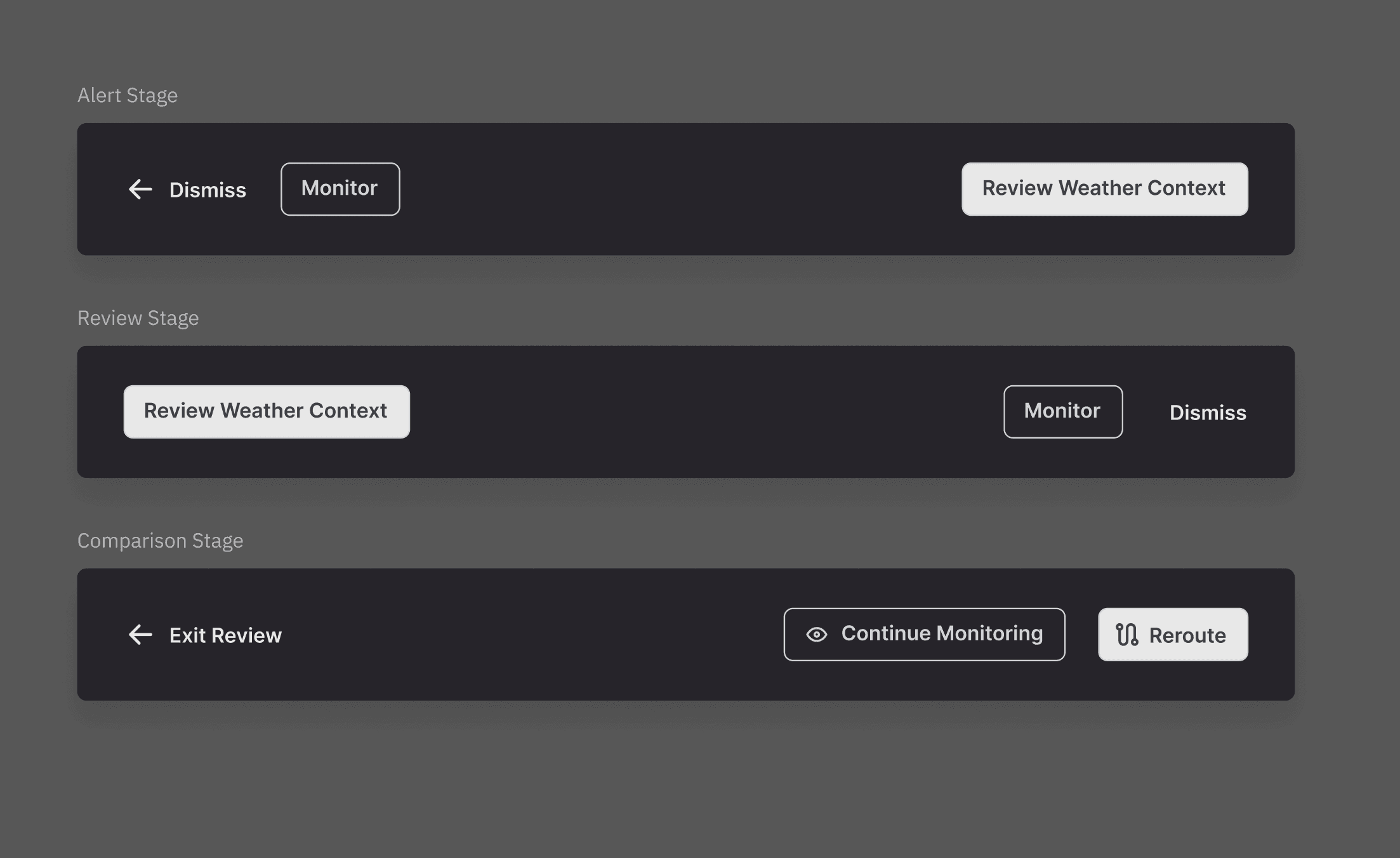
Human authority isn't just a final approve/reject button — it's embedded at every stage of the workflow. At the alert stage, dispatchers choose to investigate, monitor, or dismiss. At the review stage, they can continue monitoring or request reroute evaluation. At the comparison stage, they can exit, keep monitoring, or commit to a reroute.

Every stage includes an exit path and a deferral option. The system never forces a binary decision under time pressure — dispatchers can always choose to keep watching without losing their place in the evaluation.

My Rationale

The consistent three-option pattern (exit/defer, continue monitoring, advance) across all screens was a deliberate design system decision. Dispatchers shouldn't have to relearn the control model at each stage. The primary action escalates in commitment as the workflow progresses — from "Review" to "Request Evaluation" to "Reroute" — but the escape hatch is always in the same position.

My Rationale

The consistent three-option pattern (exit/defer, continue monitoring, advance) across all screens was a deliberate design system decision. Dispatchers shouldn't have to relearn the control model at each stage. The primary action escalates in commitment as the workflow progresses — from "Review" to "Request Evaluation" to "Reroute" — but the escape hatch is always in the same position.

Consistent Authority Controls at Every Stage

Previously: Binary approve/reject with no way to defer or investigate further.

Human authority isn't just a final approve/reject button — it's embedded at every stage of the workflow. At the alert stage, dispatchers choose to investigate, monitor, or dismiss. At the review stage, they can continue monitoring or request reroute evaluation. At the comparison stage, they can exit, keep monitoring, or commit to a reroute.


Every stage includes an exit path and a deferral option. The system never forces a binary decision under time pressure — dispatchers can always choose to keep watching without losing their place in the evaluation.

System Status & AI Transparency

Previously: AI felt like a black box — no visibility into what it was doing or whether it would act autonomously.

Previously: AI felt like a black box — no visibility into what it was doing or whether it would act autonomously.


The AI Support panel makes the system's current state explicitly visible: what it's monitoring, what it has concluded, and — critically — what it has not done. The status messages ("Monitoring active," "No reroute proposed yet") communicate that the AI is observing but not acting, reinforcing that the dispatcher remains in control.

The panel includes a persistent footer: "All actions require explicit human confirmation and are recorded for operational accountability." This isn't just informational — it's a trust signal that the system will never bypass the dispatcher.

My Rationale

I added the "Request Reroute Evaluation" button so dispatchers can proactively ask the AI to assess options — rather than waiting for the system to propose one. This inverts the typical AI-initiates → human-approves pattern into a human-requests → AI-supports model, putting the dispatcher in the driver's seat even for AI analysis.

More Case Studies

[United] Flight Release Wizard
[United] Flight Release Wizard: Integrated and streamlined a fragmented flight release process for dispatchers.
[United] Flight Release Wizard
[United] Flight Release Wizard: Integrated and streamlined a fragmented flight release process for dispatchers.

Scenario-Based Iteration with Dispatchers

I developed 10 operational scenarios spanning single-factor triggers to multi-variable emergencies.


Each scenario was walked through with dispatchers using low-fidelity wireframes, testing whether the explanation panel surfaced the right reasoning at the right level of detail.

SAFETY

Severe Weather Deviation

Thunderstorm develops mid-route. Dispatchers evaluate whether the reroute prioritizes safety, fuel, or delay mitigation.

COMPLIANCE

Airspace Restriction Update

Temporary flight restriction activates. Dispatchers verify compliance and the regulatory driver behind the change.

EFFICIENCY

Fuel Efficiency Optimization

Stable conditions allow a minor reroute for fuel savings. Dispatchers need transparency into calculation and tradeoffs.

SAFETY

Turbulence Severity Escalation

Conditions shift from moderate to severe. Dispatchers confirm severity threshold and passenger safety impact.

TRADE OFF

Fuel Constraint Tradeoff

Thunderstorm develops mid-route. Dispatchers evaluate whether the reroute prioritizes safety, fuel, or delay mitigation.

Why Scenarios?

Dispatchers couldn't evaluate the design in the abstract. They needed realistic operational pressure such as a weather deviation and a fuel constraint to judge whether the explanation model matched how they actually think under load.

Deliverables: AI Explanation Panel · Redesigned approval workflow · Decision factor hierarchy

04

Solution

Previously: Dispatchers opened 3 tools to determine if action was needed.

The experience begins with an alert card that surfaces the operational event driving the recommendation — weather impact, airspace restriction, or congestion — along with flight-specific context: flight number, route, detection time, and severity level.


The card appears contextually on the map view, anchored to the affected flight. Dispatchers see exactly which flight is impacted and why before they take any action.

My Rationale

I chose to lead with the trigger rather than the route change itself.

During scenario walkthroughs, dispatchers consistently asked "why is this happening?" before "what should I do?" The alert mirrors that mental model — event first, action options second.
Reroute Trigger & Context

Previously: Dispatchers opened 3 tools to determine if action was needed.

When a dispatcher taps "Review Weather Context," the system reveals the operational data behind the alert: aircraft state (type, fuel, altitude), an impact summary with specific segment and weather data, and a system engagement section explaining what triggered the automated review.


Information is structured as a progressive disclosure — the most critical data (impact summary) appears first, with aircraft context and system reasoning layered below. The animated text sequence reinforces the feeling that the system is actively processing and presenting its analysis, not just dumping data.

My Rationale

I deliberately separated "what the route is" from "why the AI suggests it." The collapsed state supports fast scanning and comparison. The expanded "Explain" state supports deeper evaluation.


During scenario testing, dispatchers said they compare top-level metrics first, then drill into reasoning only for the options they're seriously considering. The progressive disclosure matches that behavior exactly.

Ranked Decision Factors

Previously: Routes were abstract data — hard to compare mentally.

The comparison view presents AI-generated route options side by side, each with a clear optimization label (Balanced, Fuel Efficient, Shortest Time), key metrics (duration, fuel), and risk/compliance tags. The map visualizes routes against weather overlays with layer toggles for radar, satellite, jet stream, turbulence, and icing.


Each route card has an "Explain" action that expands to reveal the AI's rationale, tradeoffs, supporting data, and constraints — giving dispatchers the full reasoning chain without cluttering the comparison view by default.

My Rationale

I deliberately separated "what the route is" from "why the AI suggests it." The collapsed state supports fast scanning and comparison. The expanded "Explain" state supports deeper evaluation.


During scenario testing, dispatchers said they compare top-level metrics first, then drill into reasoning only for the options they're seriously considering. The progressive disclosure matches that behavior exactly.

Route Comparison + AI Assist

Previously: Dispatchers opened 3 tools to determine if action was needed.

When a dispatcher taps "Review Weather Context," the system reveals the operational data behind the alert: aircraft state (type, fuel, altitude), an impact summary with specific segment and weather data, and a system engagement section explaining what triggered the automated review.


Information is structured as a progressive disclosure — the most critical data (impact summary) appears first, with aircraft context and system reasoning layered below. The animated text sequence reinforces the feeling that the system is actively processing and presenting its analysis, not just dumping data.

My Rationale

I structured this as a vertical narrative rather than a dashboard grid. Dispatchers don't compare these data points — they read them sequentially to build a mental picture of the situation.


The layout follows that reading pattern: what's happening → where → how fast → what the system thinks.

Ranked Decision Factors

Ranked Decision Factors

Previously: Dispatchers opened 3 tools to determine if action was needed.

When a dispatcher taps "Review Weather Context," the system reveals the operational data behind the alert: aircraft state (type, fuel, altitude), an impact summary with specific segment and weather data, and a system engagement section explaining what triggered the automated review.


Information is structured as a progressive disclosure — the most critical data (impact summary) appears first, with aircraft context and system reasoning layered below. The animated text sequence reinforces the feeling that the system is actively processing and presenting its analysis, not just dumping data.

My Rationale

I structured this as a vertical narrative rather than a dashboard grid. Dispatchers don't compare these data points — they read them sequentially to build a mental picture of the situation.


The layout follows that reading pattern: what's happening → where → how fast → what the system thinks.

Previously: Binary approve/reject with no way to defer or investigate further

Human authority isn't just a final approve/reject button — it's embedded at every stage of the workflow. At the alert stage, dispatchers choose to investigate, monitor, or dismiss. At the review stage, they can continue monitoring or request reroute evaluation. At the comparison stage, they can exit, keep monitoring, or commit to a reroute.


Every stage includes an exit path and a deferral option. The system never forces a binary decision under time pressure — dispatchers can always choose to keep watching without losing their place in the evaluation.

My Rationale

The consistent three-option pattern (exit/defer, continue monitoring, advance) across all screens was a deliberate design system decision. Dispatchers shouldn't have to relearn the control model at each stage. The primary action escalates in commitment as the workflow progresses — from "Review" to "Request Evaluation" to "Reroute" — but the escape hatch is always in the same position.

Consistent Authority Controls at Every Stage

Previously: AI felt like a black box — no visibility into what it was doing or whether it would act autonomously.

The AI Support panel makes the system's current state explicitly visible: what it's monitoring, what it has concluded, and — critically — what it has not done. The status messages ("Monitoring active," "No reroute proposed yet") communicate that the AI is observing but not acting, reinforcing that the dispatcher remains in control.


The panel includes a persistent footer: "All actions require explicit human confirmation and are recorded for operational accountability." This isn't just informational — it's a trust signal that the system will never bypass the dispatcher.

My Rationale

I added the "Request Reroute Evaluation" button so dispatchers can proactively ask the AI to assess options — rather than waiting for the system to propose one. This inverts the typical AI-initiates → human-approves pattern into a human-requests → AI-supports model, putting the dispatcher in the driver's seat even for AI analysis.

System Status & AI Transparency

Flight Release Wizard
Flight Release Wizard: transforming a flight release process.

More Case Studies

PILLAR 02

Explainability

The AI system now communicates its reasoning across three progressive layers: why a review was triggered, what the operational impact looks like, and how competing route options compare. Each layer gives dispatchers a different depth of understanding without requiring them to leave the interface.

PILLAR 02

Cognitive Load Reduction

Rather than adding another tool to the dispatcher's workflow, the design consolidates scattered operational data into a single progressive interface. Each screen reduces the number of systems touched and presents information in the order dispatchers actually process it.

PILLAR 02

Human Authority

The system is designed so that at no point does the AI take action without explicit dispatcher confirmation. Every screen reinforces that the AI is presenting evidence and options the dispatcher holds the authority to act, defer, or override.

01 Problem

Methods: HEART Framework | GSM

Team: Lead Dispatchers | Product Manager | Senior Developers | Director of Ops

02 Design Approach

Methods: Scenario-based design | Rapid wireframing | Cross-functional iteration

Team: Lead Dispatchers | Product Manager | Senior Developers

Design Challenge

Design a centralized explanation interface that makes AI reroute reasoning visible, scannable, and trustworthy — without adding steps to the dispatcher's workflow or undermining their operational authority.

REAL-TIME CONTEXT

HUMAN-IN-THE-LOOP

SECONDS-LEVEL SCANNING

Design Challenge

Design a centralized explanation interface that makes AI reroute reasoning visible, scannable, and trustworthy — without adding steps to the dispatcher's workflow or undermining their operational authority.

REAL-TIME CONTEXT

HUMAN-IN-THE-LOOP

SECONDS-LEVEL SCANNING

Summary of My Role & Impact

I led the UX strategy and interaction design, translating complex operational data (weather, fuel, compliance, and risk factors) into clear, explainable decision support.


The design introduced structured rationale, trade-off visibility, and guided AI explanations that reduced cognitive load while preserving dispatcher authority in safety-critical decisions.

Lack of centralized reasoning

4.4 / 5

Manual cross-checking burden

4 tools

1 panel

Limited explainability & trust

76%